Is this your app?
Claim Pixfy AI to manage its page, add your badge and see your traffic — free, and it stays free.
Cycling through all six. Tap any point to stop.
Measured on six things
Pixfy AI simplifies photo and video editing with AI-powered conversational commands for quick, professional results.
Security
60Basic web encryption assumed but lacks transparent privacy policies about data retention and image handling.
Screenshots
1 / 1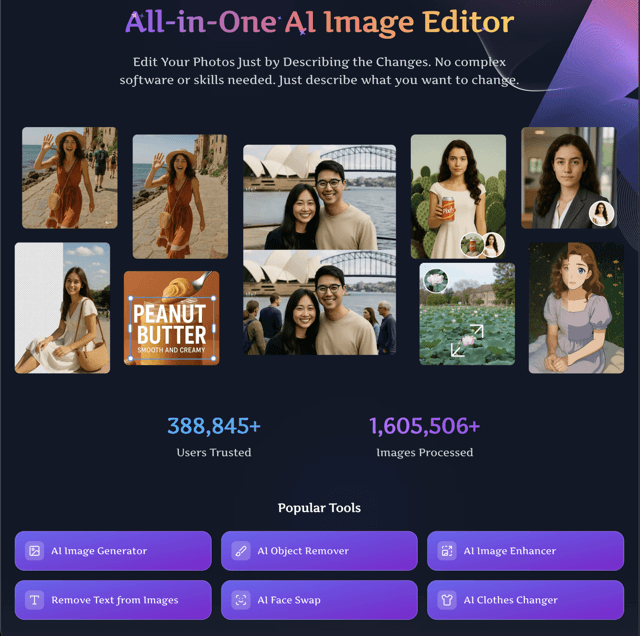
About this app
Pixfy AI is an innovative all-in-one platform that leverages artificial intelligence to make photo and video editing accessible to everyone. Instead of wrestling with complex tools and steep learning curves, users can simply describe their desired changes in plain language—like 'remove the background' or 'enhance colors'—and the AI handles the rest. Key features include an AI image generator, object remover, background changer, and face swap capabilities, all designed for speed and ease. It's particularly useful for social media creators, e-commerce sellers, and casual users who need polished visuals without the hassle. The interface is minimalist and intuitive, focusing on a text-input bar that feels more like a chat than a traditional editor. While it excels in usability and speed, with most edits processed in seconds, it could improve in areas like multi-language support, accessibility features, and transparent privacy policies. Overall, Pixfy AI democratizes editing, making it a go-to for anyone overwhelmed by professional software.
Key features
- 1AI-powered conversational editing using natural language commands
- 2Instant background removal and object elimination tools
- 3All-in-one platform for both photo and video editing needs
Target customer profile
Drawn from the product itself, not from a survey.
Demographic
Social Media Content Creators
Pain points
Time-consuming edits, need for visually appealing posts daily
Primary needs
Quick background removal, object elimination, and style enhancements
Demographic
E-commerce Sellers
Pain points
High volume of product images requiring professional touch
Primary needs
Efficient background changes, object removal for clean listings
Demographic
Personal Users
Pain points
Limited editing skills and software complexity
Primary needs
Simple face swaps, photo enhancements, and fun edits
Scout Review
Written by AI from measured evidence, scored out of 100.
Pixfy AI successfully democratizes photo editing by replacing complex tools with simple text commands. It's the perfect solution for anyone intimidated by traditional editing software but needing professional-looking results. The AI understands natural language surprisingly well, and the speed is impressive for most common tasks. While security and accessibility need attention, the core functionality delivers exactly what it promises: quick, quality edits without the steep learning curve.
Measure by measure
Usability
90Text-driven commands eliminate complex menus, making editing intuitive even for complete beginners with zero design experience.
Design
80Clean, minimalist interface with neutral colors that focus attention on the conversational text input bar for AI commands.
Speed
80Processes most edits in seconds as promised, though performance may vary during peak server loads.
Security
60Basic web encryption assumed but lacks transparent privacy policies about data retention and image handling.
Accessibility
60Limited language support and no clear screen reader compatibility, excluding non-English speakers and users with disabilities.
Growth
90High market demand for AI editing tools positions it well for expansion with proper feature development.
Improvement areas
- Transparent privacy policies and data handling documentation
- Multi-language support for global accessibility
- Screen reader compatibility and disability accommodations
Design & Usability
Pixfy AI's design philosophy centers around minimalism done right. The interface greets you with a clean, distraction-free workspace where the main attraction is a simple text input bar - think ChatGPT for your photos. The neutral color scheme keeps the focus on your images rather than flashy UI elements. What really shines is the usability: instead of hunting through layers of menus, you just type what you want. 'Remove background,' 'enhance colors,' or 'make it look professional' - the AI interprets natural language commands and delivers results. This conversational approach dramatically lowers the learning curve that typically plagues photo editing software.
Speed & Security
When it comes to performance, Pixfy AI delivers on its speed promises. Most basic edits like background removal or color correction process in under 10 seconds, making it perfect for batch editing product images or quick social media touch-ups. The web-based platform ensures you don't need powerful hardware. However, security is the area that gives me pause. While the site likely uses standard HTTPS encryption, there's no detailed privacy policy explaining how your uploaded images are handled, stored, or whether they're used to train their AI models. For casual users editing public content, this might be acceptable, but professionals handling sensitive images should proceed with caution.
Accessibility & Growth
Accessibility feels like an afterthought with Pixfy AI. The interface appears to be English-only, which limits its global appeal despite the conversational approach being perfect for international users. There's no mention of screen reader compatibility, keyboard navigation enhancements, or other inclusive design elements. On the bright side, the growth potential is substantial. The AI photo editing market is exploding, and Pixfy's unique text-command approach differentiates it from competitors. With additional language support, mobile app development, and expanded AI capabilities, this platform could easily become a household name for quick, professional edits.
Conclusion
If you're a social media creator drowning in daily content demands, an e-commerce seller needing to process hundreds of product images, or just someone who wants better photos without becoming a Photoshop expert, Pixfy AI is worth trying. The conversational editing approach feels like magic the first time you type a command and watch the AI execute it perfectly. Give the free version a spin - you might find yourself wondering how you ever managed without it.
Suggestions for improvement
- Add multi-language support to make conversational editing accessible globally
- Publish transparent privacy policies detailing image storage and data usage
- Implement screen reader compatibility and keyboard navigation for accessibility
- Develop a mobile app version to capture the on-the-go editing market
Alternatives comparison
Named competitors, point by point. Nobody paid to appear here or to be left out.
 Pixfy AI Pixfy AI |  Pixlr Pixlr |  Canva Canva |  Adobe Express Adobe Express | |
|---|---|---|---|---|
| AI Conversational Editing | Yes - Core feature | No - Traditional tools only | Limited - Template-focused AI | No - Manual editing required |
| Free Tier Availability | Yes - Free version available | Yes - Extensive free features | Yes - Freemium model | Limited - Subscription for full features |
| Background Removal Speed | Seconds - AI instant processing | Minutes - Manual tools required | Quick - One-click AI removal | Fast - Professional AI tools |
Pixlr
A free online editor with AI features, but lacks conversational editing.
Canva
Offers AI photo editing within a design suite, though more template-focused.
Adobe Express
Provides AI background removal, but requires subscription for full features.
Comparing options? See Pixfy AI alternatives, scored side by side
More Design & Creativity apps
View all Design & Creativity
RoomCreator
92An AI-powered interior and exterior design tool that tran...

QRBliss
91Branded QR codes with AI Brand Sync, 15 free dynamic code...

ThumbnailMaker
90AI YouTube thumbnail maker: paste a video link, get the brief, the thumbnail, and a check at feed size.

English Test Coach
89English Test Coach checks your IELTS essays and letters, gives an estimated band score across all four criteria, and tells you exactly what to revise next.

All of Us
89Add deceased loved ones to photos with AI and see free pr...

Tracé slides
89Interactive math & physics slides with live graphs and an...

FontPlop
89Browser-based font viewer & tester for TTF, OTF, WOFF, WO...

What the GIF
89Frame-perfect video-to-GIF maker that runs entirely in yo...

Portrait Gift
88AI-powered personalized face swap art platform creating c...

TranscriptYou
88Free YouTube transcript generator with timestamps and AI ...

BeartIMAGE
88BeartIMAGE is a free, web-based image processing platform engineered for fast, bulk photo editing and conversion directly in your browser.

RestorePhotosApp
88An AI-powered photo restoration app that brings old, blur...


A platform dedicated to providing unbiased reviews of newly launched applications, analyzing everything from their features to their full potential.
info@scoutforge.net© 2026 Scoutforge. All rights reserved.
