Cycling through all six. Tap any point to stop.
Measured on six things
AI-powered background remover for clean transparent PNGs ...
Security
52HTTPS enforced with frame protection, X-Content-Type-Options and Referrer-Policy, but no HSTS, no CSP, no Permissions-Policy, no secure-cookie flags, and no SPF or DMARC records. No security page, no SOC 2/ISO/GDPR statement, no bug bounty — a thin, early-stage posture.
Screenshots
1 / 1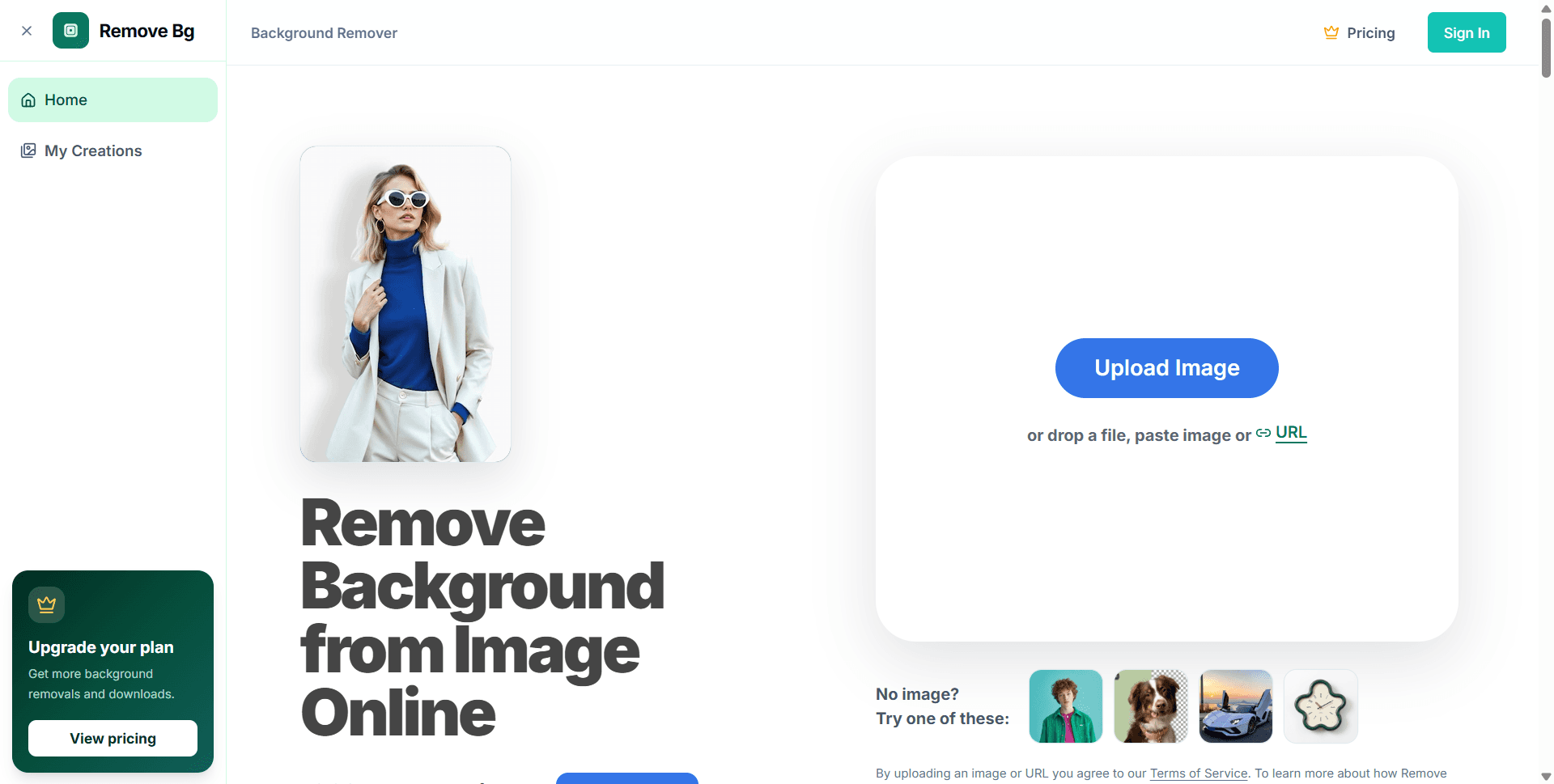
About this app
Remove BG is a browser-based AI background removal tool that instantly isolates subjects from images, delivering transparent PNGs with impressive precision. It handles product photos, portraits, pets, vehicles, logos, and more, preserving fine details like hair and fur. The workflow is straightforward: upload an image (or paste a URL), let the AI process it, then refine edges with Erase/Restore tools before downloading in HD. With support for JPG, PNG, WebP, and ZIP files (up to 20MB each), it accommodates various use cases. The free tier offers trial credits, while paid plans provide additional removals and downloads. Ideal for e-commerce sellers, designers, marketers, and photographers, Remove BG eliminates the need for manual masking, making professional-quality cutouts accessible to everyone. Its browser-based nature ensures privacy and convenience without software installation. Whether you're preparing product listings, real estate visuals, or social media content, Remove BG st...
Key features
- 1Browser-based AI background removal with transparent PNG output; supports JPG, PNG, WebP and ZIP up to 20MB, batch of 5 on the free surface.
- 2Erase and Restore edge-refinement tools plus a before/after comparison slider for reviewing cutouts before download.
- 3Four-tier credit pricing from $4.50/mo Starter to $65.50/mo Enterprise, with batch API access from the Pro tier and daily bonus credits.
Target customer profile
Drawn from the product itself, not from a survey.
Demographic
E-commerce sellers and marketplace managers
Pain points
Manual background removal is time-consuming and inconsistent for product listings.
Primary needs
Quick, consistent, and clean product cutouts for online stores and ads.
Demographic
Graphic designers and photographers
Pain points
Struggling with complex edges like hair and fur; need precise cutouts.
Primary needs
High-quality transparent PNGs with fine detail preservation and editing tools.
Demographic
Content creators and social media managers
Pain points
Limited budget and time for professional editing tools; need fast turnaround.
Primary needs
Easy-to-use, browser-based solution for creating engaging visuals on the fly.
Scout Review
Written by AI from measured evidence, scored out of 100.
Remove BG is a competent, focused browser-based background remover that gets the fundamentals right: no signup wall, upload box on screen one, batch of five, before/after slider, and a clean four-tier pricing page. It is fast on desktop (Lighthouse 97) and acceptable on mobile (83, LCP 4.1s). It is also, unmistakably, a product standing in remove.bg's shadow — same category, near-identical name, and a feature list (transparent PNG, hair/fur preservation, erase/restore) that every competitor already ships. Security is the weakest dimension: 5/13 on the header checklist, no HSTS, no CSP, no SPF or DMARC, and no published compliance or security documentation. Accessibility has a real flaw — user-scalable=no blocks pinch-zoom — plus contrast and labelling failures. The pricing model is the most user-hostile part of the experience: credits, removals and expiring daily bonus credits that reset at UTC midnight. For an early-stage tool it is a solid start; for a buyer choosing between it and remove.bg, Clipping Magic or Photoroom, the case is price and batch API, not capability.
Measure by measure
Usability
64Zero-friction onboarding: no signup to reach the dropzone, drag-and-drop, URL paste, example images and 5-file batch all on screen one. But there's no docs page or help center in the nav, and the credits-vs-removals-vs-daily-bonus pricing math takes real reading to untangle.
Design
62Clean, focused single-purpose tool page with a strong before/after slider and a tidy 4-tier pricing table. But the name, logo and copy sit in remove.bg's shadow, and the nine testimonial 'creators' have no photos, companies or links — stock-proof energy.
Speed
71Lighthouse mobile 83/100 (LCP 4.1s, CLS 0, TBT 28ms, FCP 1.2s) and desktop 97/100. The page is light and stable once it paints, but a 4.1s mobile LCP is the visible weak spot. No published inference-time benchmarks — 'seconds' is a claim, not a measurement.
Security
52HTTPS enforced with frame protection, X-Content-Type-Options and Referrer-Policy, but no HSTS, no CSP, no Permissions-Policy, no secure-cookie flags, and no SPF or DMARC records. No security page, no SOC 2/ISO/GDPR statement, no bug bounty — a thin, early-stage posture.
Accessibility
58Lighthouse a11y 86/100, but five failing audits: prohibited ARIA attributes, insufficient color contrast, links without discernible names, visible labels not matching accessible names, and user-scalable=no blocking pinch-zoom. No accessibility statement, no WCAG claim, no language switcher.
Growth
54Real, paying problem with a clear buyer (e-commerce sellers, designers, marketers). But the pitch — browser-based, erase/restore, transparent PNG — is table stakes against remove.bg, Clipping Magic and Photoroom. The $4.50/mo Starter and Pro-tier batch API are the only real wedges.
Improvement areas
- Security posture is thin: no HSTS, CSP, Permissions-Policy or secure cookies, no SPF/DMARC, and no published security or compliance documentation.
- Accessibility has a real WCAG 1.4.4 failure (user-scalable=no blocks pinch-zoom) plus contrast, unnamed-link and mismatched-label issues; no a11y statement.
- Pricing model mixes credits, removals and expiring daily bonus credits, making plan comparison harder than it needs to be; no docs or help center in the nav.
Design & Usability
Remove BG's landing page does the one thing a tool page should: it puts the upload box on screen one, no signup, with drag-and-drop, URL paste, example images and 5-file batch all visible. The before/after slider is the best design decision on the site — it shows the product working instead of describing it. The pricing page is tidy, with a monthly/yearly toggle and a comparison table that actually compares. Where it falls down is identity: the name and logo sit directly in remove.bg's shadow, and the nine testimonials are named 'creators' with no photos, companies or links — the kind of social proof that reads as copy, not customers. Usability is strong at the front door and weaker in the hallway: there is no docs page, no help center, no tutorial linked from the nav, and the pricing model asks users to reconcile credits, removals and expiring daily bonus credits before they can decide anything. A first-time visitor can remove a background in under a minute; a first-time buyer has to do arithmetic.
Speed & Security
Speed is the most measurable dimension here and the numbers are mixed. Lighthouse desktop performance is 97/100 and mobile is 83/100, with CLS 0 and TBT 28ms — the page is light and stable once it paints. The mobile LCP of 4.1s is the visible weak spot, and there are no published benchmarks for the actual AI inference time, so 'remove backgrounds in seconds' remains a marketing claim rather than a measured one. Security is where the product is thinnest. HTTPS is enforced and frame protection, X-Content-Type-Options and Referrer-Policy are present, but HSTS, CSP, Permissions-Policy and secure-cookie flags are all absent, and there are no SPF or DMARC DNS records — meaning the domain has no email-spoofing protection. The header checklist scored 5/13. There is no security page, no SOC 2 or ISO statement, no GDPR-specific disclosure, no bug bounty and no pen-test report. For an early-stage indie tool that is not unusual, but the site leans on 'private, browser-based processing' as a selling point without backing it with any published data-handling detail beyond a Privacy Policy link in the upload consent line.
Accessibility & Growth
Accessibility scored 86/100 on the automated Lighthouse audit, but the failing list is more revealing than the score: prohibited ARIA attributes, insufficient color contrast, links without discernible names, visible text labels that do not match accessible names, and — the worst of them — user-scalable=no in the viewport meta, which blocks pinch-zoom on mobile and is a direct WCAG 1.4.4 failure. There is no accessibility statement, no WCAG conformance claim and no language switcher, so the site has not been audited against a standard. Growth is a judgement about the idea, not the traction. The problem is real and the buyers are specific: e-commerce sellers, designers, marketers and photographers already pay for background removal. But the pitch — browser-based, erase/restore, transparent PNG — is table stakes against remove.bg (API and bulk), Clipping Magic (AI plus manual for e-commerce) and Photoroom (mobile-first with templates). The only genuine wedges are price ($4.50/mo Starter undercuts the low end) and Pro-tier batch API access. The domain is 0.1 years old, so this is very early; the idea can grow, but nothing in the product's own material explains why a buyer picks it over the three alternatives listed.
Conclusion
If you are a small e-commerce seller or a freelancer who needs clean cutouts without a subscription that costs more than your hosting, Remove BG is worth a trial — the free credits and the no-signup upload make that decision cheap. If you need API reliability at scale, documented data handling, or an accessibility-compliant tool for a public-facing site, the missing security headers, absent compliance documentation and the pinch-zoom block are real reasons to look at remove.bg or Clipping Magic instead. The product works; the question is whether 'works, and cheaper' is enough to pull buyers away from a category leader with a decade of brand recognition. Fix the security headers, publish a real privacy and data-handling page, drop user-scalable=no, and simplify the credit math — those four changes would move this from a competent clone to a credible alternative.
Suggestions for improvement
- Add HSTS, CSP, Permissions-Policy and secure-cookie flags, and publish SPF/DMARC records — the header checklist is 5/13 and email spoofing is unprotected.
- Remove user-scalable=no from the viewport meta and fix the contrast, unnamed-link and mismatched-label failures flagged by Lighthouse.
- Publish a real security and data-handling page: what happens to uploaded images, retention, and any SOC 2/ISO/GDPR position.
- Simplify pricing: collapse credits, removals and expiring daily bonus credits into one unit so buyers can compare plans without a spreadsheet.
Alternatives comparison
Named competitors, point by point. Nobody paid to appear here or to be left out.
 Remove BG Remove BG |  Remove.bg Remove.bg | Clipping Magic |  Photoroom Photoroom | |
|---|---|---|---|---|
| Free tier / trial availability | Free trial credits; no signup required to reach the upload box | Free previews at low resolution; credits required for full-res downloads | Free trial credits; paid plans for full-resolution exports | Free tier with watermarks/limits; Pro subscription for full features |
| Entry-level paid price | $4.50/mo Starter (billed annually), 200 removals/month | Subscription credits; higher entry price than Remove BG | Credit packs and subscriptions; mid-range entry price | Pro subscription; mobile-first pricing tiers |
| Batch processing | Up to 5 images free; 10–100 per batch on paid tiers | Bulk processing available on paid plans and via API | Bulk upload and processing for e-commerce workflows | Batch tools available on higher tiers |
| Manual edge refinement (erase/restore) | Erase and Restore tools for edge cleanup before download | Limited manual editing; primarily automated output | Strong manual editing suite alongside AI, e-commerce focused | Editing and design templates rather than fine edge masking |
| API access | Batch API from Pro tier; Advanced API from Ultra and Enterprise | Mature, well-documented API with bulk endpoints | API available for e-commerce integrations | API available on business plans |
| Platform focus | Browser-based web tool; no native mobile app | Web-first with API and integrations | Web-based, e-commerce workflow focus | Mobile-first with design and template features |
Remove.bg
Similar AI background remover with API and bulk processing options.
Clipping Magic
Offers both AI and manual editing for precise cutouts, with a focus on e-commerce.
Photoroom
Mobile-first background remover with additional design and template features.
Comparing options? See Remove BG alternatives, scored side by side
More Design & Creativity apps
View all Design & Creativity
RoomCreator
92An AI-powered interior and exterior design tool that tran...

QRBliss
91Branded QR codes with AI Brand Sync, 15 free dynamic code...

ThumbnailMaker
90AI YouTube thumbnail maker: paste a video link, get the brief, the thumbnail, and a check at feed size.

English Test Coach
89English Test Coach checks your IELTS essays and letters, gives an estimated band score across all four criteria, and tells you exactly what to revise next.

All of Us
89Add deceased loved ones to photos with AI and see free pr...

Tracé slides
89Interactive math & physics slides with live graphs and an...

FontPlop
89Browser-based font viewer & tester for TTF, OTF, WOFF, WO...

What the GIF
89Frame-perfect video-to-GIF maker that runs entirely in yo...

Portrait Gift
88AI-powered personalized face swap art platform creating c...

TranscriptYou
88Free YouTube transcript generator with timestamps and AI ...

BeartIMAGE
88BeartIMAGE is a free, web-based image processing platform engineered for fast, bulk photo editing and conversion directly in your browser.

RestorePhotosApp
88An AI-powered photo restoration app that brings old, blur...


A platform dedicated to providing unbiased reviews of newly launched applications, analyzing everything from their features to their full potential.
info@scoutforge.net© 2026 Scoutforge. All rights reserved.
