Cycling through all six. Tap any point to stop.
Measured on six things
Remove burned-in text, subtitles and watermarks from video with AI.
Design
58Editorial serif hero and disciplined magenta accent give it personality, but competing nav CTAs and shifting heading systems make the page read as stacked templates.
Screenshots
1 / 1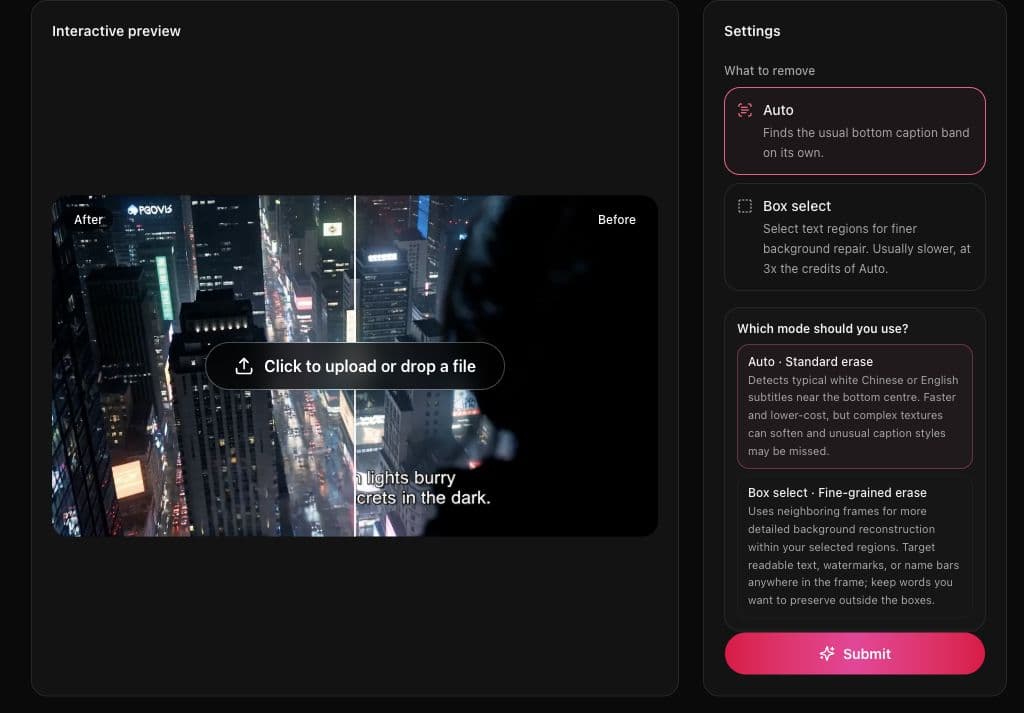
About this app
RTFV is an online tool that removes burned-in subtitles, captions, timestamps, logos, and watermarks from video using AI. Upload a clip, choose how to find the text, and download a version with the original frame intact. There is nothing to install and no timeline to learn.
Key features
- 1AI removal of burned-in subtitles, captions, timestamps, logos and watermark text without cropping or black bars.
- 2Two erase modes: Auto for conventional bottom captions (1 credit/s) and Box select for targeted regions (3 credits/s).
- 3Per-second credit billing with failed tasks refunded automatically and Stripe-handled payments.
- 4Uploads up to 2GB and 2K resolution, output up to 1080P, files auto-deleted 30 days after upload.
Target customer profile
Drawn from the product itself, not from a survey.
Scout Review
Written by AI from measured evidence, scored out of 100.
RTFV is a focused, well-built tool for a specific job: erasing burned-in subtitles, timestamps and watermark text from video without cropping or black bars. The engineering is the best part — 97 mobile / 100 desktop Lighthouse performance with a video preview in the hero is not accidental. The pricing model is honest and legible: per-second credits, Auto at 1/s and Box select at 3/s, failed tasks refunded, Stripe handling payments. The design has personality (editorial serif, single magenta accent) but loses discipline in the nav and heading system. Documentation lives on the homepage rather than in a help center, and the page over-explains. Security and accessibility are solid on the measurable basics but stop short of published audits or conformance statements. It's a competent early-stage product with a real niche and a clear differentiator; the work ahead is trust signals and distribution, not the core tool.
Measure by measure
Usability
61Auto vs Box select is surfaced in the hero with credit cost stated, and pricing math is transparent. But the page repeats its explainer and buries upload under scroll.
Design
58Editorial serif hero and disciplined magenta accent give it personality, but competing nav CTAs and shifting heading systems make the page read as stacked templates.
Speed
88Lighthouse mobile 97/100 (LCP 2.4s, CLS 0, TBT 91ms) and desktop 100/100. Genuinely fast, no lag complaints in evidence.
Security
74Strong header hygiene (HSTS, CSP, frame protection, SPF) and Stripe-handled payments. Missing Permissions-Policy and DMARC, and no published audit or compliance page.
Accessibility
80Lighthouse a11y 100/100, plus a language switcher and theme toggle. No published WCAG statement, so automated checks are the ceiling of what's verified.
Growth
62Real, specific problem (burned-in captions) with a concrete wedge: per-second billing and a two-mode erase. Early-stage domain, but the idea has a clear reason to exist.
Improvement areas
- Two competing nav CTAs and inconsistent heading typography weaken an otherwise distinctive landing page.
- Homepage over-explains the process across repeated sections; a dedicated help center would let it be trimmed.
- No published security compliance (SOC 2/ISO/pen-test) or DMARC/Permissions-Policy headers.
- No WCAG conformance statement or accessibility page to back up the 100/100 automated score.
Design & Usability
RTFV's homepage has a real point of view: a large italic serif headline over a near-black canvas with one disciplined magenta accent, and an interactive before/after preview that shows the product working instead of describing it. That's better than most utility-tool landing pages. The cracks show in consistency — the nav carries two competing CTAs ('Sign Up Get 30 credits' and 'Get Started'), and heading styles switch between serif, bold sans and small-caps eyebrows down the page, so it reads as several templates stacked. Usability is solid where it counts: the hero Settings panel surfaces the Auto vs Box select decision immediately with credit cost stated, and the pricing page spells out the credit math (Auto 1/s, Box select 3/s, failed tasks refunded). The cost is length — the page re-explains how AI removal works across multiple sections, and the upload overlay competes with the demo video. A user who just wants to drop a file has to scroll past a lot of prose first.
Speed & Security
Speed is the standout. Lighthouse mobile performance lands at 97/100 with LCP 2.4s, CLS 0 and TBT 91ms; desktop hits a perfect 100/100. For a media tool with an interactive video preview in the hero, that's a genuinely well-built front end, and there are no lag complaints in the collected evidence. Security is competent but not exceptional: HTTPS is enforced with HSTS, CSP, frame protection, X-Content-Type-Options, Referrer-Policy and SPF all present — 10 of 12 checklist points. The gaps are Permissions-Policy and DMARC, and there's no published SOC 2, ISO, pen-test or bug-bounty page. Payments run through Stripe and the site states card details are never stored, which is the right call. For an early-stage indie tool this is a reasonable posture, but it's table stakes rather than a trust signal you can point a procurement team at.
Accessibility & Growth
Accessibility scores a clean 100/100 on Lighthouse's automated axe-core audit, and the site ships a language switcher and theme toggle — good indirect signals. What's missing is anything beyond automated checks: no published WCAG conformance statement, no accessibility page, no documented keyboard or screen-reader support. Automated audits catch maybe a third of real WCAG issues, so treat the 100 as a floor, not a certificate. On growth, the idea holds up. Removing burned-in subtitles and watermarks without cropping or blurring is a real, recurring problem for translators, reposters and editors, and RTFV names a specific wedge: per-second billing instead of rounded minutes, plus a two-mode erase (fast Auto vs finer Box select at 3x credits). That's a concrete reason to pick it over generic video editors. The limit is distribution — the domain is barely weeks old, and the category has no network effects to compound. It can grow on execution and SEO, not on lock-in.
Conclusion
If you regularly deal with hardcoded captions — translation workflows, reposting, cleaning up old footage — RTFV is worth a test run, and the per-second billing means a short clip costs pennies to try. Go in expecting a young product: no help center, no compliance page, no third-party reviews to lean on yet. The tool itself does what it says, quickly, and the pricing doesn't try to trick you. That's a better starting position than most apps in this space have.
Suggestions for improvement
- Collapse the two nav CTAs into one primary action; 'Sign Up Get 30 credits' and 'Get Started' are fighting each other.
- Unify the heading system — pick serif or sans for section titles and stick to it so the page stops reading as stacked templates.
- Add a real help/docs section separate from the homepage so the explainer prose can be trimmed and users can find answers on demand.
- Publish a security and accessibility page: DMARC, Permissions-Policy, and a WCAG conformance statement would convert the 100/100 into a trust signal.
Alternatives comparison
Named competitors, point by point. Nobody paid to appear here or to be left out.
 Remove Text From Video |  | |
|---|---|---|
| Removes burned-in subtitles without cropping or blur | Yes — AI temporal inpainting rebuilds the covered area | Not specified in provided details |
| Pricing model | Per-second credits: Auto 1/s, Box select 3/s; plans from $3.90/mo | Not specified in provided details |
| Free trial / credits to start | 30 credits on signup per nav CTA | Not specified in provided details |
| Max upload size and resolution | 2GB, 2K input, 1080P output | Not specified in provided details |
| Installation required | No — browser-based, no timeline to learn | Not specified in provided details |
Comparing options? See Remove Text From Video alternatives, scored side by side
More Design & Creativity apps
View all Design & Creativity
RoomCreator
92An AI-powered interior and exterior design tool that tran...

QRBliss
91Branded QR codes with AI Brand Sync, 15 free dynamic code...

ThumbnailMaker
90AI YouTube thumbnail maker: paste a video link, get the brief, the thumbnail, and a check at feed size.

English Test Coach
89English Test Coach checks your IELTS essays and letters, gives an estimated band score across all four criteria, and tells you exactly what to revise next.

All of Us
89Add deceased loved ones to photos with AI and see free pr...

Tracé slides
89Interactive math & physics slides with live graphs and an...

FontPlop
89Browser-based font viewer & tester for TTF, OTF, WOFF, WO...

What the GIF
89Frame-perfect video-to-GIF maker that runs entirely in yo...

Portrait Gift
88AI-powered personalized face swap art platform creating c...

TranscriptYou
88Free YouTube transcript generator with timestamps and AI ...

BeartIMAGE
88BeartIMAGE is a free, web-based image processing platform engineered for fast, bulk photo editing and conversion directly in your browser.

RestorePhotosApp
88An AI-powered photo restoration app that brings old, blur...


A platform dedicated to providing unbiased reviews of newly launched applications, analyzing everything from their features to their full potential.
info@scoutforge.net© 2026 Scoutforge. All rights reserved.
