Cycling through all six. Tap any point to stop.
Measured on six things
Create polished screenshot designs and mockups for every channel
Accessibility
52Responsive design and high-contrast CTAs, but no WCAG mentions, accessibility statement, or keyboard navigation docs. Site is English-only.
Screenshots
1 / 1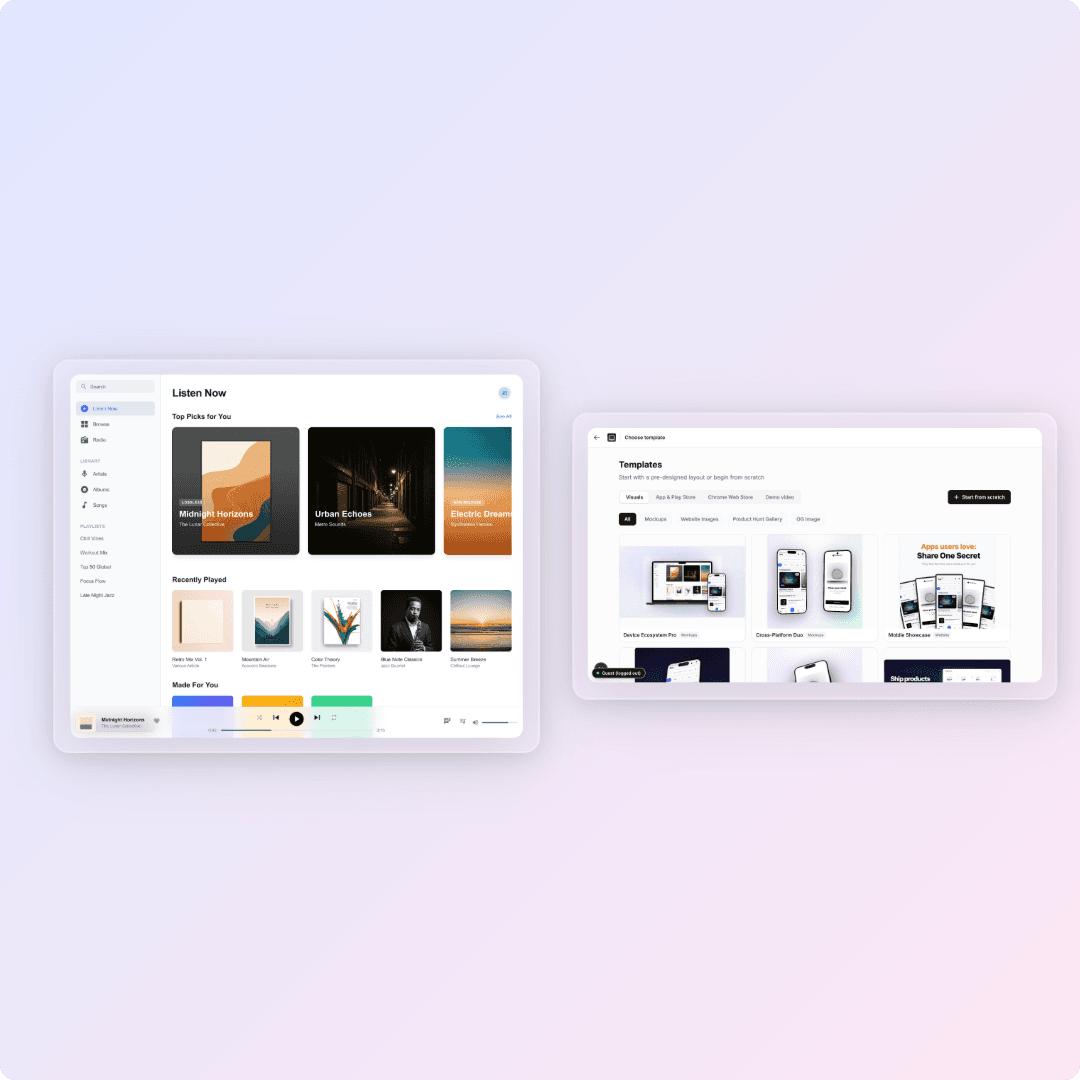
About this app
Screenhance helps founders, marketers, creators, and app teams turn screenshots into polished, launch-ready visual assets. Start from a large library of professionally designed templates or build in the editor, then create App Store and Google Play screenshot sets, Product Hunt galleries, website visuals, social graphics, OG images, and mockups for phones, tablets, laptops, desktops, browsers, watches, TVs, print, apparel, outdoor scenes, and more. Localize designs, export in multiple formats, and create animated GIF or WebM assets. Free to start and no design skills required.
Key features
- 1180+ editable templates, 113 device frames, and 170+ photorealistic scenes for mockups.
- 2Animation-native exports (GIF/WebM) with float, reveal, and parallax effects.
- 3Built-in store localization across 16 locales, including RTL Arabic and CJK.
- 4Launch Kit: one brief generates App Store, Play Store, Product Hunt, OG, and website visuals.
- 5Multi-format export (PNG, WebP, JPEG, GIF, WebM, MP4) up to 3x Retina.
Target customer profile
Drawn from the product itself, not from a survey.
Demographic
Indie app developers and startup founders
Pain points
Need professional-looking App Store screenshots and marketing assets but lack design skills and time
Primary needs
Quick, no-design mockups and screenshot sets across multiple device sizes and languages
Demographic
Product designers and UX professionals
Pain points
Spending too much time on manual mockups in Figma or Photoshop for presentations and portfolios
Primary needs
Rapid, high-quality mockups with device frames and backgrounds that look polished
Demographic
Marketing leads and content creators
Pain points
Creating consistent visuals for product launches, social media, and ad campaigns across different platforms
Primary needs
Efficient generation of OG images, social cards, hero images, and animated assets
Scout Review
Written by AI from measured evidence, scored out of 100.
Screenhance is a polished, well-positioned mockup tool that understands its audience: indie devs and founders who need launch-ready visuals without design skills. The design is excellent, the pricing is smart, and the feature set (animation, localization, 113 frames) outshines peers like Shots.so and Smartmockups. But it's not without flaws: accessibility is an afterthought, security lacks some best practices, and the speed claims are unverified. If you're launching an app and need screenshots fast, it's worth a try — just don't expect a miracle on the free plan.
Measure by measure
Usability
68Clear 3-step workflow, free plan, and dedicated use-case pages reduce learning curve. No third-party reviews to confirm ease-of-use claims.
Design
82Polished, modern UI with high-fidelity mockups, consistent typography, and a clear value proposition. Visual audit rated 'excellent'.
Speed
60No measured performance data; site claims fast exports but homepage is image-heavy. HTTPS/HSTS suggest decent hosting, but no benchmarks verified.
Security
64HTTPS, HSTS, and DMARC present; missing CSP and frame protection. No compliance certifications found, but no red flags either.
Accessibility
52Responsive design and high-contrast CTAs, but no WCAG mentions, accessibility statement, or keyboard navigation docs. Site is English-only.
Growth
72Real problem, clear differentiators (animation, localization), and pricing undercuts peers. Category has headroom; wedge is strong for indie devs.
Improvement areas
- Add CSP and frame protection headers to improve security posture.
- Publish an accessibility statement and WCAG compliance documentation.
- Provide performance benchmarks or a demo video to substantiate speed claims.
- Expand site localization to match the 16-locale store translation feature.
- Add third-party reviews or case studies to build trust beyond self-reported ratings.
Design & Usability
Screenhance nails the first impression: a clean, modern landing page with high-fidelity mockups that actually demonstrate the product. The floating dual-window layout is a smart way to show before/after without a tutorial. Usability is solid for a self-serve tool — the 3-step workflow and free plan lower the barrier, though the lack of third-party reviews means the 'easy' claims are unverified. The pricing is transparent and competitive, but the real test is whether the editor matches the marketing polish.
Speed & Security
Speed is a mixed bag: the site claims fast exports, but the homepage is image-heavy and there's no measured performance data to back it up. Security is decent for an indie tool — HTTPS, HSTS, and DMARC are in place, but missing CSP and frame protection are notable gaps. No compliance certifications, but no red flags either. For a tool handling screenshots, I'd want a bit more transparency on data handling, but it's not a dealbreaker.
Accessibility & Growth
Accessibility is the weakest link: no WCAG mentions, no a11y statement, and the site is English-only despite offering 16-locale localization as a feature. That's a missed opportunity. Growth potential is strong, though — the problem is real, and the differentiators (animation, localization, pricing) are concrete. The wedge for indie devs is clear, and the category has room. If they can nail accessibility and prove the speed claims, they could carve out a solid niche.
Conclusion
Screenhance is a solid choice for its niche, but it needs to walk the talk on accessibility and security to reach the next level. The free plan is a good entry point, and the $6 Launch Pass is a no-brainer for a launch week. If they add an a11y statement and a few security headers, they'd be hard to beat. For now, it's a strong 'try it and see' — just keep your expectations in check on the free tier.
Suggestions for improvement
- Add an accessibility statement and WCAG compliance documentation.
- Implement CSP and frame protection headers to harden security.
- Publish performance benchmarks or a demo video to back up speed claims.
- Expand site localization to match the 16-locale store translation feature.
Alternatives comparison
Named competitors, point by point. Nobody paid to appear here or to be left out.
 Screenhance Screenhance |  Shots.so Shots.so |  Smartmockups Smartmockups |  Placeit Placeit | |
|---|---|---|---|---|
| Animated exports (GIF/WebM) | Yes | No | No | No |
| App Store screenshot sets (multi-slide) | Yes | No | Limited | No |
| Store localization (16 locales) | Yes | No | No | No |
| Free plan (exports/month) | 3 | 5 | Watermarked | Watermarked |
| Pricing (paid) | $6/week or $12/month | $5/month | $19/month | $15/month |
Shots.so
Similar mockup generator but with fewer device frames and no animated exports. Free plan has limited features.
Smartmockups
Popular mockup tool with many templates, but lacks App Store localization and animated exports. Free plan watermarks heavily.
Placeit
Enthusiasts for t-shirt and product mockups, but not specialized for App Store screenshots or multiple device sizes.
Comparing options? See Screenhance alternatives, scored side by side
More Design & Creativity apps
View all Design & Creativity
RoomCreator
92An AI-powered interior and exterior design tool that tran...

QRBliss
91Branded QR codes with AI Brand Sync, 15 free dynamic code...

ThumbnailMaker
90AI YouTube thumbnail maker: paste a video link, get the brief, the thumbnail, and a check at feed size.

English Test Coach
89English Test Coach checks your IELTS essays and letters, gives an estimated band score across all four criteria, and tells you exactly what to revise next.

All of Us
89Add deceased loved ones to photos with AI and see free pr...

Tracé slides
89Interactive math & physics slides with live graphs and an...

FontPlop
89Browser-based font viewer & tester for TTF, OTF, WOFF, WO...

What the GIF
89Frame-perfect video-to-GIF maker that runs entirely in yo...

Portrait Gift
88AI-powered personalized face swap art platform creating c...

TranscriptYou
88Free YouTube transcript generator with timestamps and AI ...

BeartIMAGE
88BeartIMAGE is a free, web-based image processing platform engineered for fast, bulk photo editing and conversion directly in your browser.

RestorePhotosApp
88An AI-powered photo restoration app that brings old, blur...


A platform dedicated to providing unbiased reviews of newly launched applications, analyzing everything from their features to their full potential.
info@scoutforge.net© 2026 Scoutforge. All rights reserved.
