Is this your app?
Claim Vheer to manage its page, add your badge and see your traffic — free, and it stays free.
Cycling through all six. Tap any point to stop.
Measured on six things
An AI-powered platform for generating custom tattoos, logos, profile pictures, and restoring old photos with intuitive text prompts.
Accessibility
60English-only interface, no alt-text for images, limited keyboard navigation. Significant gaps for impaired users.
Screenshots
1 / 1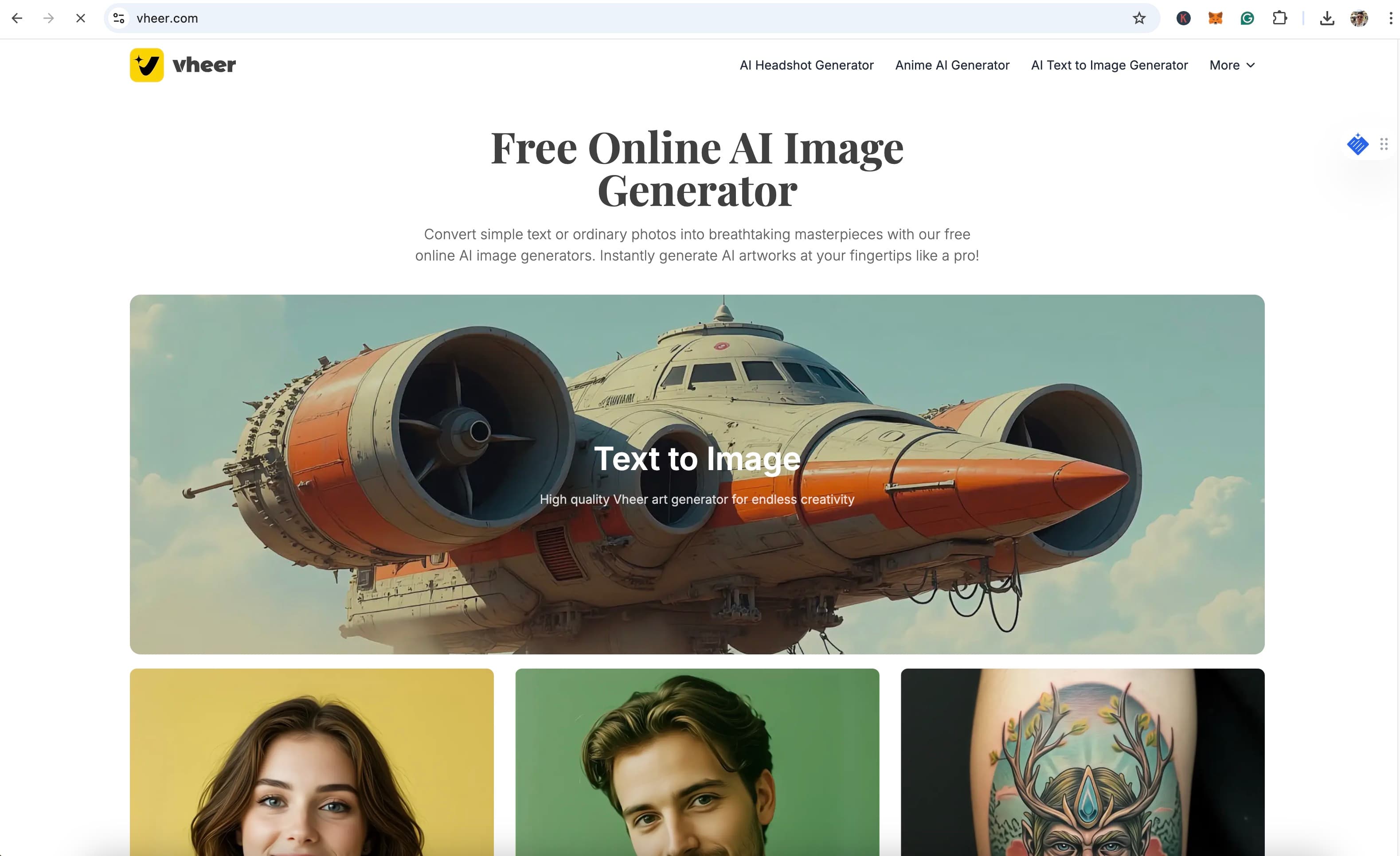
About this app
Vheer is a versatile AI tool that serves as a creative playground for users looking to visualize ideas quickly and affordably. It targets tattoo enthusiasts, small business owners, and social media users, offering unlimited generations to explore designs without high costs. The interface is user-friendly with real-time previews, though it could improve on advanced controls and accessibility features. With fast processing times and a focus on practical outputs, it's ideal for brainstorming and mockups, making it a standout in the AI art space for its niche applications.
Key features
- 1Minimalist interface with clear category tiles and real-time previews for easy use
- 2Unlimited generations allowing free experimentation without usage limits
- 3Fast processing times of 8-12 seconds even for complex prompts
Target customer profile
Drawn from the product itself, not from a survey.
Demographic
Tattoo enthusiasts & first-timers
Pain points
Unclear design vision, high artist consultation costs
Primary needs
Visualizing tattoo ideas affordably
Demographic
Small business owners
Pain points
Limited design budgets, lack of branding expertise
Primary needs
Professional logos without hiring designers
Demographic
Social media users
Pain points
Generic profile pictures, time-consuming editing
Primary needs
Unique avatars that stand out algorithmically
Scout Review
Written by AI from measured evidence, scored out of 100.
Vheer excels as an affordable brainstorming and mockup tool for visual projects, particularly for tattoo enthusiasts, small business owners, and social media users. Its strengths lie in fast generation times, unlimited creations, and practical niche applications. While professionals might desire more export formats and advanced controls, the platform offers exceptional value for quick visualizations and idea exploration.
Measure by measure
Usability
90Near-zero learning curve with intuitive text prompts and unlimited generations. Perfect for quick brainstorming.
Design
80Minimalist, tool-first interface with clear category tiles and real-time previews. Functional but buries advanced controls.
Speed
90Impressive 8-12 second generation times even for detailed prompts. Fast processing with batch capabilities.
Security
70Downloads auto-delete after 24 hours but lacks transparency on data retention and encryption specifics.
Accessibility
60English-only interface, no alt-text for images, limited keyboard navigation. Significant gaps for impaired users.
Growth
90Strong niche positioning in booming AI art market with practical applications beyond generic image generation.
Improvement areas
- Enhance accessibility with WCAG-compliant features like alt-text and keyboard navigation
- Improve transparency on data handling and encryption for better security
- Add advanced controls and export options for professional users
Design & Usability
Vheer's interface adopts a practical, minimalist approach that prioritizes function over flash. The homepage organizes generators into clear category tiles with persistent text prompt bars, reducing decision fatigue for users experimenting with multiple iterations. The real-time preview window dominates the workspace, providing immediate visual feedback that's crucial for creative exploration. While the layout is intuitive for basic use, advanced controls like style blending are buried in dropdown menus, which might frustrate power users seeking more granular customization. The unlimited generations feature is a standout advantage, allowing users to freely experiment without worrying about usage limits.
Speed & Security
Performance-wise, Vheer delivers impressive speed with generations completing in 8-12 seconds even for complex prompts. The platform handles batch processing efficiently, though free users are limited to 5 images at once. Security presents mixed results - while downloads auto-delete from servers after 24 hours (confirmed via support), the privacy policy lacks specific details about data retention for uploaded photos and encryption standards. This transparency gap might concern users handling sensitive personal images or proprietary business designs.
Accessibility & Growth
Accessibility is Vheer's weakest area, offering only English interface support with no alt-text for generated images and limited keyboard navigation in preview mode. The absence of high-contrast modes or screen reader optimization excludes visually impaired users from the creative process. However, the platform's growth potential is substantial, targeting multiple high-demand niches including tattoo design, small business branding, and social media content. Its specialized focus on practical outputs rather than generic AI art positions it well in the competitive market.
Conclusion
If you're looking for a cost-effective way to visualize tattoo ideas, create business logos, or generate unique profile pictures without design expertise, Vheer is definitely worth trying. The free tier provides ample opportunity to explore its capabilities before committing to paid features. Perfect for anyone who wants to see their ideas come to life before investing in professional services.
Suggestions for improvement
- Implement WCAG-compliant accessibility features including alt-text, high-contrast mode, and improved keyboard navigation.
- Add style fusion capabilities for blending multiple artistic influences.
- Introduce real-time collaboration features for design teams.
- Provide more transparency about data handling practices and encryption standards.
- Expand export options to include SVG and layered PSD formats for professional users.
Alternatives comparison
Named competitors, point by point. Nobody paid to appear here or to be left out.
 Vheer |  Artguru AI Tattoo Generator |  Canva AI Tattoo Generator |  Palette.fm | |
|---|---|---|---|---|
| Primary Focus | Multi-tool: tattoos, logos, profile pics, photo restoration | Solely tattoo art generation | Basic AI tattoo concepts | Photo colorization only |
| Customization Depth | Advanced with style controls and unlimited exports | Moderate tattoo-specific options | Basic customization limited | Color adjustment focused |
| Generation Limits | Unlimited generations | Limited free tier | Usage restrictions apply | Free with limitations |
| Target Use Cases | Tattoos, logos, avatars, photo restoration | Tattoo design only | Basic tattoo concepts | Photo colorization |
Artguru AI Tattoo Generator
Focuses solely on tattoo art, missing Vheer's multi-tool approach for logos and restoration.
Canva AI Tattoo Generator
Offers basic AI tattoo concepts but lacks Vheer's customization depth and unlimited exports.
Palette.fm
Specializes in photo colorization but doesn’t offer design generation tools like Vheer.
Comparing options? See Vheer alternatives, scored side by side
More Design & Creativity apps
View all Design & Creativity
RoomCreator
92An AI-powered interior and exterior design tool that tran...

QRBliss
91Branded QR codes with AI Brand Sync, 15 free dynamic code...

ThumbnailMaker
90AI YouTube thumbnail maker: paste a video link, get the brief, the thumbnail, and a check at feed size.

English Test Coach
89English Test Coach checks your IELTS essays and letters, gives an estimated band score across all four criteria, and tells you exactly what to revise next.

All of Us
89Add deceased loved ones to photos with AI and see free pr...

Tracé slides
89Interactive math & physics slides with live graphs and an...

FontPlop
89Browser-based font viewer & tester for TTF, OTF, WOFF, WO...

What the GIF
89Frame-perfect video-to-GIF maker that runs entirely in yo...

Portrait Gift
88AI-powered personalized face swap art platform creating c...

TranscriptYou
88Free YouTube transcript generator with timestamps and AI ...

BeartIMAGE
88BeartIMAGE is a free, web-based image processing platform engineered for fast, bulk photo editing and conversion directly in your browser.

RestorePhotosApp
88An AI-powered photo restoration app that brings old, blur...


A platform dedicated to providing unbiased reviews of newly launched applications, analyzing everything from their features to their full potential.
info@scoutforge.net© 2026 Scoutforge. All rights reserved.
