Is this your app?
Claim WhatsCrop to manage its page, add your badge and see your traffic — free, and it stays free.
Cycling through all six. Tap any point to stop.
Measured on six things
A free online tool for cropping and enhancing WhatsApp profile photos with ease.
Security
60Basic HTTPS protection but no clear data encryption or privacy policy details provided.
Screenshots
1 / 1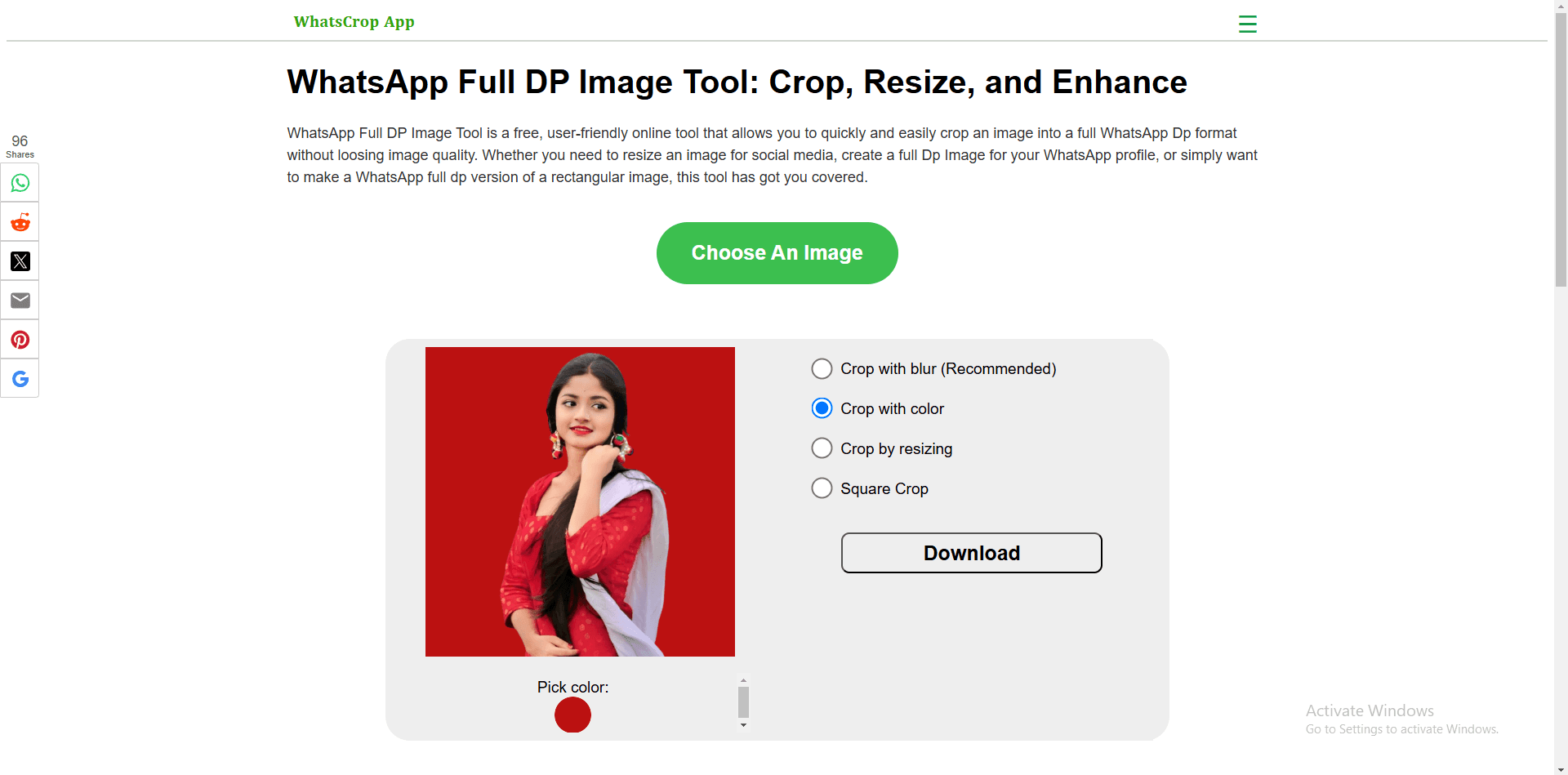
About this app
WhatsCrop is a web-based application that simplifies image editing for WhatsApp DP and other social media platforms. It offers features like batch processing, HD output, and multilingual support, making it ideal for users who need quick, polished visuals without downloads or accounts. With a clean interface and drag-and-drop functionality, it's perfect for social media enthusiasts, small businesses, and multilingual users seeking an accessible and efficient editing solution.
Key features
- 1Clean minimalist interface with drag-and-drop functionality for easy use.
- 2Near-instant processing speed and batch upload capability for efficiency.
- 3Multilingual support in four languages, enhancing accessibility for global users.
Target customer profile
Drawn from the product itself, not from a survey.
Demographic
Social media users
Pain points
Blurry or poorly cropped profile pictures; inconsistent branding
Primary needs
Easy-to-use tool for creating polished DPs
Demographic
Small business owners
Pain points
Time-consuming manual editing; lack of design skills
Primary needs
Batch processing and HD output for professional visuals
Demographic
Multilingual users
Pain points
Limited language support in similar tools
Primary needs
Accessible interface in native languages
Scout Review
Written by AI from measured evidence, scored out of 100.
WhatsCrop delivers exactly what it promises: a dead-simple, free tool for creating perfect WhatsApp profile pictures without any fuss. Its strength lies in its focused functionality and exceptional ease of use. While it lacks advanced features and has some security transparency issues, it outperforms competitors in its specific niche of WhatsApp DP optimization. The batch processing capability and multilingual support are particularly valuable for users managing multiple profiles or non-English speakers.
Measure by measure
Usability
90Zero learning curve with intuitive workflow - upload, crop, download. Perfect for non-tech users.
Design
80Clean minimalist interface with drag-and-drop functionality, muted color scheme keeps focus on image editing.
Speed
90Near-instant processing even for batch uploads, no noticeable lag during editing operations.
Security
60Basic HTTPS protection but no clear data encryption or privacy policy details provided.
Accessibility
70Supports 4 languages but lacks screen reader compatibility and keyboard navigation options.
Growth
80High demand for social media tools with clear expansion potential into mobile apps and advanced features.
Improvement areas
- Enhance security with clear data encryption policies and privacy details.
- Add accessibility features like screen reader compatibility and keyboard navigation.
- Develop a mobile app version to expand usability and market reach.
Design & Usability
WhatsCrop's design philosophy embraces minimalism to its core. The interface presents a clean, uncluttered workspace with a prominent drag-and-drop zone that immediately guides users toward the primary action. The muted white and gray color scheme effectively keeps attention focused on the image being edited rather than distracting UI elements. Navigation follows an exceptionally straightforward path: upload, select cropping style, make adjustments, and download. This simplicity makes it accessible to absolutely anyone, though power users might find the lack of advanced controls limiting. The drag-and-drop functionality works flawlessly, and the entire editing process feels intuitive from start to finish.
Speed & Security
Performance is where WhatsCrop truly shines. Image uploads and processing happen in near-real time, even when handling multiple files through batch processing. The web application feels responsive throughout the editing workflow without any noticeable lag. However, security measures are less impressive. While the site uses basic HTTPS encryption for data transfer, there's no visible privacy policy link or detailed information about how user uploads are handled. The absence of clear data retention policies and encryption details for stored images might concern privacy-conscious users. For a tool handling personal images, stronger security transparency would significantly boost confidence.
Accessibility & Growth
WhatsCrop's multilingual support covering English, Portuguese, Turkish, and German demonstrates thoughtful consideration for global users. This language diversity sets it apart from many single-language cropping tools. However, accessibility features for users with disabilities are noticeably absent - no screen reader support, keyboard navigation options, or alt text for interface elements. The high contrast interface helps with readability, but there's room for improvement. Growth potential is substantial given the massive demand for social media optimization tools. The core functionality works excellently, and expansion into mobile apps, additional editing features, or social platform integrations could make this a market leader.
Conclusion
If you're tired of awkwardly cropped profile pictures that cut off heads or important elements, WhatsCrop is the effortless solution you've been looking for. It's perfect for social media enthusiasts, small business owners maintaining brand consistency, and anyone who values simplicity over complex editing suites. The fact that it requires no downloads, accounts, or payments makes it risk-free to try. For quick, polished WhatsApp DPs that make you look professionally put together, this tool delivers remarkably well.
Suggestions for improvement
- The development team should prioritize creating a mobile app version to capture the on-the-go editing market.
- Adding basic image adjustment tools like brightness, contrast, and filters would enhance functionality without complicating the interface.
- Security transparency needs immediate attention - clearly stating data handling practices and implementing proper encryption would build user trust.
- Accessibility improvements including screen reader compatibility, keyboard navigation, and dark mode would make the tool more inclusive.
- Finally, expanding social platform presets beyond WhatsApp could significantly broaden its appeal.
Alternatives comparison
Named competitors, point by point. Nobody paid to appear here or to be left out.
 WhatsCrop WhatsCrop |  Fotor WhatsApp DP Converter Fotor WhatsApp DP Converter |  PFPMaker PFPMaker |  iLoveIMG Crop Tool iLoveIMG Crop Tool | |
|---|---|---|---|---|
| WhatsApp-specific presets | Yes, dedicated 1:1 ratio and background options | Basic resizing only | No WhatsApp focus | General cropping only |
| Batch processing | Yes | No | No | Yes |
| Background customization | Blur and color options | Limited options | AI-generated backgrounds | Basic cropping only |
| Multilingual support | 4 languages | Primarily English | Limited language options | Multiple languages |
| Mobile accessibility | Web-only | Mobile app available | Web-based | Mobile-friendly website |
Fotor WhatsApp DP Converter
Offers DP resizing but lacks background customization and batch processing.
PFPMaker
AI-generated profile pictures, but no focus on WhatsApp-specific cropping.
iLoveIMG Crop Tool
General image cropping without dedicated WhatsApp DP presets.
Comparing options? See WhatsCrop alternatives, scored side by side
More Design & Creativity apps
View all Design & Creativity
RoomCreator
92An AI-powered interior and exterior design tool that tran...

QRBliss
91Branded QR codes with AI Brand Sync, 15 free dynamic code...

ThumbnailMaker
90AI YouTube thumbnail maker: paste a video link, get the brief, the thumbnail, and a check at feed size.

English Test Coach
89English Test Coach checks your IELTS essays and letters, gives an estimated band score across all four criteria, and tells you exactly what to revise next.

All of Us
89Add deceased loved ones to photos with AI and see free pr...

Tracé slides
89Interactive math & physics slides with live graphs and an...

FontPlop
89Browser-based font viewer & tester for TTF, OTF, WOFF, WO...

What the GIF
89Frame-perfect video-to-GIF maker that runs entirely in yo...

Portrait Gift
88AI-powered personalized face swap art platform creating c...

TranscriptYou
88Free YouTube transcript generator with timestamps and AI ...

BeartIMAGE
88BeartIMAGE is a free, web-based image processing platform engineered for fast, bulk photo editing and conversion directly in your browser.

RestorePhotosApp
88An AI-powered photo restoration app that brings old, blur...


A platform dedicated to providing unbiased reviews of newly launched applications, analyzing everything from their features to their full potential.
info@scoutforge.net© 2026 Scoutforge. All rights reserved.
