Is this your app?
Claim YouStylize to manage its page, add your badge and see your traffic — free, and it stays free.
Cycling through all six. Tap any point to stop.
Measured on six things
AI-powered photo stylization tool for creating artistic images like cartoons and anime with ease.
Accessibility
50No screen reader support, limited English-only interface, no contrast options.
Screenshots
1 / 1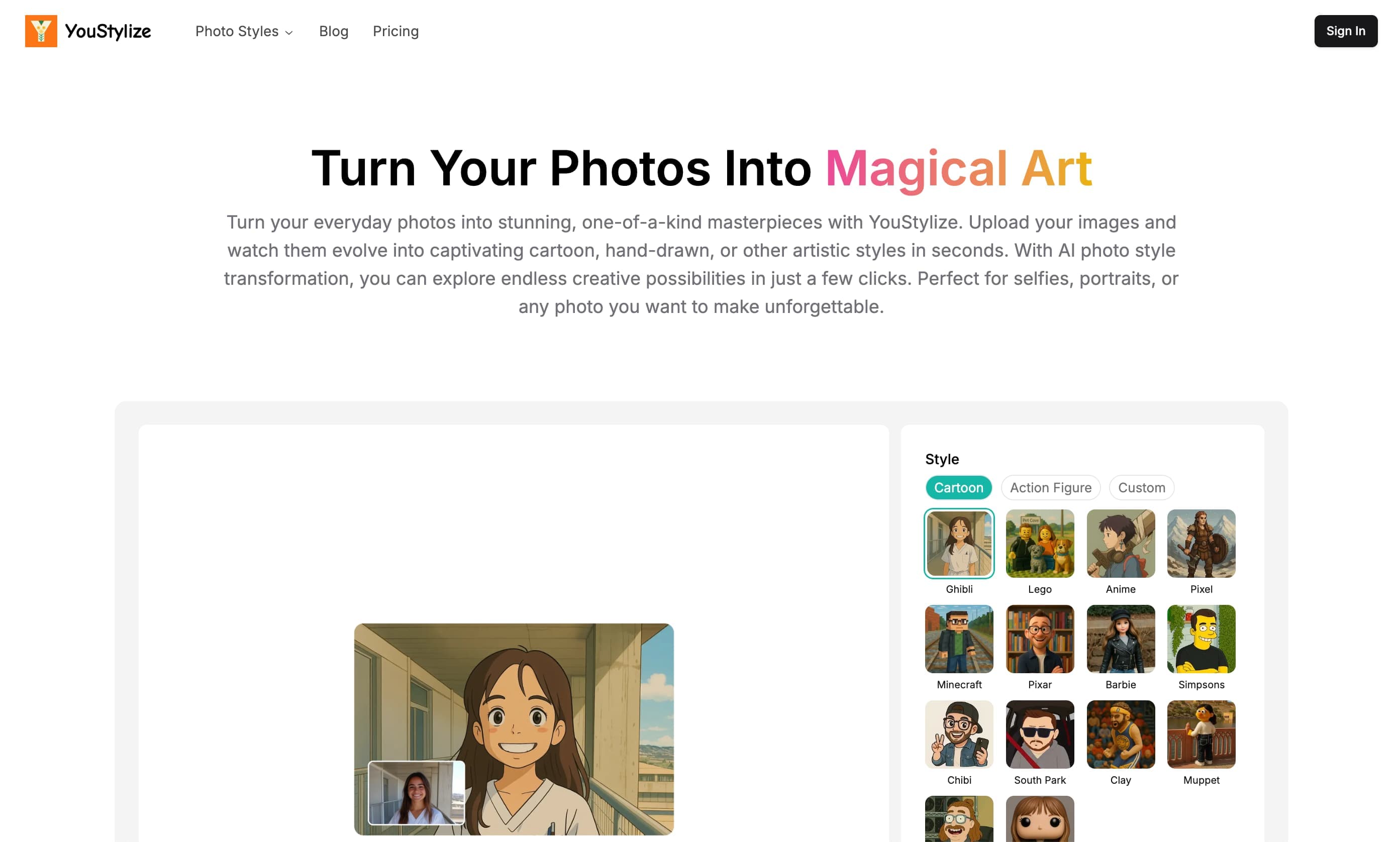
About this app
YouStylize is an innovative AI-driven platform that transforms ordinary photos into stunning artistic styles, such as cartoon, anime, and Studio Ghibli-inspired visuals. It's designed for users who want to add a creative flair to their images without needing advanced design skills. With a user-friendly interface and fast processing times, it delivers high-resolution outputs, making it perfect for social media enthusiasts, hobbyists, and anyone looking to create unique digital art quickly. While it excels in simplicity and niche aesthetics, it lacks advanced editing features and accessibility options, but its focus on viral trends makes it a fun and accessible choice for casual creators.
Key features
- 1Clean minimalist interface with intuitive three-step workflow for easy use
- 2Fast processing times of 10-15 seconds with 4K output support
- 3Specialized in popular aesthetics like anime and Studio Ghibli styles
Target customer profile
Drawn from the product itself, not from a survey.
Demographic
Social media influencers
Pain points
Needing unique visuals to stand out; limited design skills
Primary needs
Quick stylization for posts and stories
Demographic
Anime and fandom enthusiasts
Pain points
Lack of tools to recreate specific art styles like Studio Ghibli
Primary needs
Specialized filters for personal art and avatars
Demographic
Casual users
Pain points
Intimidated by complex photo editors like Photoshop
Primary needs
Simple, fast photo transformations with minimal effort
Scout Review
Written by AI from measured evidence, scored out of 100.
YouStylize excels at doing one thing exceptionally well: transforming ordinary photos into stunning artistic styles with minimal effort. Its strength lies in its laser focus on popular aesthetics like anime and Studio Ghibli-inspired visuals, delivered through an interface so intuitive that anyone can create professional-looking results in seconds. While it lacks advanced editing features and accessibility options, it perfectly serves its target audience of social media creators, anime enthusiasts, and casual users who want impressive visual transformations without complexity.
Measure by measure
Usability
90Near-zero learning curve with straightforward upload-style-download process.
Design
80Clean minimalist interface with vibrant style previews and intuitive three-step workflow.
Speed
90Impressive 10-15 second processing times with 4K output support.
Security
70HTTPS encryption and image deletion after processing, but vague long-term data policies.
Accessibility
50No screen reader support, limited English-only interface, no contrast options.
Growth
80High demand for AI art tools with strong niche positioning in anime/styles.
Improvement areas
- Add multilingual support and accessibility features like screen reader compatibility
- Expand style library to include more trends such as retro pixel art or oil painting
- Enhance security transparency with clearer data policies and GDPR compliance
Design & Usability
YouStylize's design philosophy is clearly 'less is more,' and it works beautifully for its intended audience. The clean, minimalist interface eliminates any confusion with a straightforward three-step process: upload your photo, choose from vibrant style preview thumbnails, and download your transformed image. The style picker is particularly well-executed, giving users immediate visual feedback on what each transformation will look like. While advanced users might miss manual adjustment sliders or layered editing capabilities, the simplicity is precisely what makes it accessible to casual creators who just want quick, impressive results without a learning curve.
Speed & Security
Performance is where YouStylize truly shines - processing images in just 10-15 seconds even for high-resolution uploads, with support for 4K outputs that maintain quality. The platform uses standard HTTPS encryption for data transfer and claims to delete uploaded images after processing, which provides basic security reassurance. However, the privacy policy lacks specifics about long-term data handling, GDPR compliance, or data anonymization practices. For casual users creating social media content, the security measures are adequate, but professionals handling sensitive images might want more transparency about data retention policies.
Accessibility & Growth
Accessibility is YouStylize's weakest area, with no screen reader optimization, alternative text for style previews, or adjustable contrast modes. The English-only interface limits its global reach, particularly disappointing given the international appeal of anime and artistic styles. Despite these limitations, the platform has significant growth potential due to the exploding demand for AI-powered creative tools. Its niche focus on viral aesthetics like Studio Ghibli and anime styles gives it a competitive edge, and expanding into additional popular art styles could dramatically increase its market appeal while maintaining its specialized positioning.
Conclusion
If you're looking to turn your selfies into anime avatars or create Instagram-worthy artistic content without spending hours learning complex software, YouStylize is absolutely worth trying. It's particularly ideal for social media managers, content creators, and anime fans who need quick, high-quality style transformations. The platform's specialization in viral aesthetics gives it a unique advantage over more generic photo editors. Just manage your expectations regarding professional-grade customization and accessibility features.
Suggestions for improvement
- To improve, YouStylize should prioritize adding multilingual support and basic accessibility features like screen reader compatibility and high-contrast modes.
- Introducing a free tier with watermarked outputs would help attract new users and demonstrate the tool's capabilities.
- Expanding the style library beyond current offerings to include trends like retro pixel art, oil painting, or digital art styles would significantly increase its appeal.
- Finally, batch processing capabilities would be invaluable for social media managers and content creators handling multiple images simultaneously.
Alternatives comparison
Named competitors, point by point. Nobody paid to appear here or to be left out.
 YouStylize YouStylize |  Picsart Style Transfer Picsart Style Transfer |  Adobe Firefly Generative Match Adobe Firefly Generative Match |  Daz 3D Daz 3D | |
|---|---|---|---|---|
| Style Specialization | Anime, Studio Ghibli, cartoon styles | Broad style transfer, less niche focus | Professional-grade, multiple style options | 3D modeling focus, limited 2D stylization |
| Ease of Use | Extremely simple, near-zero learning curve | Moderate learning curve | Steep learning curve, professional tools | Complex 3D interface, significant learning required |
| Processing Speed | 10-15 seconds per image | Varies, typically 20-30 seconds | 30-60 seconds for high-quality outputs | Render times can be minutes to hours |
| Target User | Casual users, social media creators | General consumers, mobile users | Professionals, designers | 3D artists, animators |
Picsart Style Transfer
Offers broader editing tools but lacks YouStylize's niche anime and Ghibli specialization.
Adobe Firefly Generative Match
Professional-grade style transfer with more control, but has a steeper learning curve.
Daz 3D
Focuses on 3D modeling and is less accessible for quick 2D stylization needs.
Comparing options? See YouStylize alternatives, scored side by side
More Design & Creativity apps
View all Design & Creativity
RoomCreator
92An AI-powered interior and exterior design tool that tran...

QRBliss
91Branded QR codes with AI Brand Sync, 15 free dynamic code...

ThumbnailMaker
90AI YouTube thumbnail maker: paste a video link, get the brief, the thumbnail, and a check at feed size.

English Test Coach
89English Test Coach checks your IELTS essays and letters, gives an estimated band score across all four criteria, and tells you exactly what to revise next.

All of Us
89Add deceased loved ones to photos with AI and see free pr...

Tracé slides
89Interactive math & physics slides with live graphs and an...

FontPlop
89Browser-based font viewer & tester for TTF, OTF, WOFF, WO...

What the GIF
89Frame-perfect video-to-GIF maker that runs entirely in yo...

Portrait Gift
88AI-powered personalized face swap art platform creating c...

TranscriptYou
88Free YouTube transcript generator with timestamps and AI ...

BeartIMAGE
88BeartIMAGE is a free, web-based image processing platform engineered for fast, bulk photo editing and conversion directly in your browser.

RestorePhotosApp
88An AI-powered photo restoration app that brings old, blur...


A platform dedicated to providing unbiased reviews of newly launched applications, analyzing everything from their features to their full potential.
info@scoutforge.net© 2026 Scoutforge. All rights reserved.
